
审批实例表单控件参数
在调用创建审批实例接口时需要使用表单控件参数,你可以通过本文了解审批实例内各表单控件的参数说明。
准备工作
审批实例的表单控件参数依据审批定义表单来配置,例如,审批定义的表单设计包括了 单行文本 和 日期区间 控件,则审批实例的表单控件参数就需要为 单行文本 和 日期区间 控件进行赋值。因此,在操作审批实例表单的控件参数前请先了解审批定义表单控件参数。
审批实例 API 不支持的控件
创建审批实例 API 未完全支持所有的审批表单控件,不支持的控件如下表所示。如果你必须使用 API 不支持的控件,则需前往飞书审批管理后台进进行操作。
| 控件/控件组 | Type |
|---|---|
| 说明 | text |
| 引用多维表格 | mutableGroup |
| 收款账户 | account |
| 流水号 | serialNumber |
| 出差控件组 | tripGroup |
| 录用控件组 | apaascorehrOnboardingGroup |
| 转正控件组 | apaascorehrRegularateGroup |
| 补卡控件组 | remedyGroupV2 |
| 调岗控件组 | apaascorehrJobAdjustGroup |
| 离职控件组 | apaascorehrOffboardingGroup |
通用参数
审批实例的表单控件均包含的参数如下表所示。
| 参数 | 类型 | 是否必填 | 描述 |
|---|---|---|---|
| id | string | 是 | 控件的 ID,需要与审批定义中的控件 ID 保持一致。 |
| type | string | 是 | 控件类型。各控件类型取值参见下文 不同控件的参数 章节。 |
| value | 不同控件的类型不同 | 是 | 控件的取值。不同控件 value 数据类型也不同,例如单行文本控件的 value 为字符串、联系人的 value 为数组。详情参见下文 不同控件的参数 章节。 |
不同控件的参数
本章节提供不同控件的 type 参数值、JSON 示例以及非通用参数说明。
单行文本
控件 type 为 input,JSON 数据示例:
{
    "id": "widget1",
    "type": "input",
    "value": "data" // string 类型
}
多行文本
控件 type 为 textarea,JSON 数据示例:
{
    "id": "widget1",
    "type": "textarea",
    "value": "data" // string 类型
}
日期
控件 type 为 date,JSON 数据示例:
{
    "id": "widget1",
    "type": "date",
    "value": "2019-10-01T08:12:01+08:00" // 需满足 RFC3339 格式的 string 类型
}
日期区间
控件 type 为 dateInterval,JSON 数据示例:
{
    "id": "widget1",
    "type": "dateInterval",
    "value": {
         "start":"2019-10-01T08:12:01+08:00",
         "end":"2019-10-02T08:12:01+08:00",
         "interval": 1.0
     }
}
value 参数为 object 类型,包含参数说明:
| 参数 | 类型 | 是否必填 | 描述 |
|---|---|---|---|
| start | string | 是 | 开始时间,需满足 RFC3339 格式。 |
| end | string | 是 | 结束时间,需满足 RFC3339 格式。 |
| interval | float | 是 | 时长(天)。 |
单选
控件 type 为 radio/radioV2,JSON 数据示例:
{
    "id": "widget1",
    "type": "radioV2",
    "value": "k2b8mkx0-h71x5gl1234-1" // string 类型
}
其中, value 表示选项值,取值范围需要参考相应审批定义中 单选 控件 option 的 value 参数。你可以调用查看指定审批定义接口,从响应结果的 form 参数中,获取单选控件 option 的 value 取值。如果关联外部选项,则 value 需要传入外部选项的 options.id。
多选
控件 type 为 checkbox/checkboxV2,JSON数据示例:
{
    "id":"widget1",
    "type":"checkboxV2",
    "value": ["k2b8mkx0-h71x5gl4321-1"] // string 类型的数组
}
其中, value 表示选项值,取值范围需要参考相应审批定义中 多选 控件 option 的 value 参数。你可以调用查看指定审批定义接口,从响应结果的 form 参数中,获取多选控件 option 的 value 取值。如果关联外部选项,则 value 需要传入外部选项的 options.id。
数字
控件 type 为 number,JSON 数据示例:
{
    "id": "widget1",
    "type": "number",
    "value": 1234.5678 // float 类型
}
金额
控件 type 为 amount,JSON 数据示例:
{
    "id": "widget1",
    "type": "amount",
    "value": 1234.5678, // float 类型
    "currency":"USD"
}
其中,currency 表示货币种类,取值范围需要参考相应审批定义中 金额 控件的 value 参数。你可以调用查看指定审批定义接口,从响应结果的 form 参数中,获取金额控件可设置的货币种类。
计算公式
控件 type 为 formula,JSON 数据示例:
{
    "id": "widget1",
    "type": "formula",
    "value": 1234.5678 // 该值由审批定义内配置的公式计算出取值,若不匹配则返回报错。
}
联系人
控件 type 为 contact,JSON 数据示例:
{
    "id":"widget1",
    "type":"contact",
    "value": ["f8ca557e"], // string 类型的数组
    "open_ids": ["ou_12345"] // string 类型的数组
}
其中,value 包含的是用户 user_id;open_ids 包含的是用户 open_id。不同用户 ID 说明可参见用户身份概述。
关联审批
控件 type 为 connect,JSON 数据示例:
{
    "id":"widget1",
    "type":"connect",
    "value": ["19EAC829-F1CB-527F-BE2A-1330422E60C0"] // string 类型的数组
}
其中,value 包含的是被关联的审批实例 Code,你可以调用获取单个审批实例详情接口,根据审批实例 Code 获取实例详情。
文档控件
控件 type 为 document,JSON 数据示例:
{
    "id": "widget1",
    "type": "document",
    "value": {
           "token":"TLLKdcpDro9ijQxA33ycNMabcef",
           "type":"docx",
    }
}
value 参数为 object 类型,包含参数说明:
| 参数 | 类型 | 是否必填 | 描述 |
|---|---|---|---|
| token | string | 是 | 文档的 document_id,详细介绍参见文档。 |
| type | string | 是 | 文档类型,支持 docx。 |
附件
控件 type 为 attachmentV2,JSON 数据示例:
{
    "id":"widget1",
    "type":"attachmentV2",
    "value": ["D93653C3-2609-4EE0-8041-61DC1D84F0B5"] // string 类型的数组
}
其中,value 包含的是调用上传文件返回的文件 code。
图片
控件 type 为 image/imageV2,JSON 数据示例:
{
    "id":"widget1",
    "type":"image",
    "value": ["D93653C3-2609-4EE0-8041-61DC1D84F0B5"] // string 类型的数组
}
其中,value 包含的是调用上传文件返回的文件 code。
明细/表格
控件 type 为 fieldList,JSON 格式示例:
{
    "id": "widget1",
    "type": "fieldList",
    "value": [
         [
            {
                "id": "widget1",
                "type": "checkbox",
                "value": ["jxpsebqp-0"]
            }
         ]
     ]
}
其中 value 是二维数组,根据审批定义内 明细/表格 控件所包含的控件,依次设置控件 JSON 值。
部门
控件 type 为 department,JSON 数据示例:
{
    "id":"widget1",
    "type":"department",
    "value":[
        {
            "open_id": "od-xxx"
        }
    ]
}
其中 value 为对象数组,通过 open_id 设置部门的 open_department_id。关于部门 open_department_id 的说明参见部门资源介绍。
电话
控件 type 为 telephone,JSON 数据示例:
{
    "id":"widget1",
    "type":"telephone",
    "value": {
        "countryCode":"+86",
        "nationalNumber":"13122222222"
    }
}
value 参数为 object 类型,包含参数说明:
| 参数 | 类型 | 是否必填 | 描述 |
|---|---|---|---|
| countryCode | string | 是 | 区号。 |
| nationalNumber | string | 是 | 电话号。 |
地址
控件 type 为 address,JSON 数据示例:
{
	"id": "widget1",
	"type": "address",
	"value": [{
		"id": "290557",
		"detailAddress": "详细的地址"
	}]
}
value 参数为 []object 类型,参数说明如下:
| 参数 | 类型 | 是否必填 | 描述 |
|---|---|---|---|
| value | []object | 是 | 非出差控件组场景地址控件仅支持单个地址,传入多个时默认只取第一个 |
| └ id | string | 是 | 区域ID, 可通过审批的地理库接口获取 |
| └ detailAddress | string | 否 | 详细的地址,若表单配置中未开启填写详细地址,则会忽略该参数,即使传入也不会生效 |
换班控件组
控件 type 为 shiftGroup,JSON 数据示例:
{
    "id": "widget1",
    "type": "shiftGroup",
    "value": {
         "shiftTime": "2019-10-01T08:12:01+08:00",
         "returnTime": "2019-10-02T08:12:01+08:00",
         "reason": "ask for leave"
     }
}
value 参数为 object 类型,包含参数说明:
| 参数 | 类型 | 是否必填 | 描述 |
|---|---|---|---|
| shiftTime | string | 是 | 换班时间,需满足 RFC3339 格式。 |
| returnTime | string | 是 | 对调日期,需满足 RFC3339 格式。 |
| reason | string | 是 | 换班原因。 |
请假控件组
请假控件组请求示例
{
    "id": "widgetLeaveGroupV2",
    "type": "leaveGroupV2",
    "value": [
      {
        "id": "widgetLeaveGroupType",
        "type": "radioV2",
        "value": "7488925543484620819"
      },
      {
        "id": "widgetLeaveGroupStartTime",
        "type": "date",
        "value": "2025-08-25T11:30:00+08:00"
      },
      {
        "id": "widgetLeaveGroupEndTime",
        "type": "date",
        "value": "2025-08-26T11:35:00+08:00"
      },
      {
        "id": "widgetLeaveGroupReason",
        "type": "textarea",
        "value": "123123"
      },
      {
        "id": "widgetLeaveCertification",
        "type": "image",
        "value": [
          "B69F8E26-0EAA-4A92-9B80-DA613CD36136"
        ]
      },
      {
        "id":"widgetLeaveCertification",
        "type":"image",
        "value": ["D93653C3-2609-4EE0-8041-61DC1D84F0B5"]
      },
      {
        "id": "widgetLeaveGroupFeedingArrivingLate",
        "type": "radioV2",
        "value": "30"
      },
      {
        "id": "widgetLeaveGroupFeedingOffLeaveEarly",
        "type": "radioV2",
        "value": "30"
      }
    ]
}
请假控件组包含参数说明:
| id | 类型 | JSON示例 | 描述 |
|---|---|---|---|
| id | string | 是 | 控件组ID,固定为widgetLeaveGroupV2 |
| type | string | 是 | 控件组类型,固定为leaveGroupV2 |
| value | object[] | 是 | 控件组的值,值为多个子控件值的列表 |
value中包含的子控件值说明:
| id | 类型 | JSON示例 | 描述 |
|---|---|---|---|
| widgetLeaveGroupType | radioV2 | `{ "id": "widgetLeaveGroupType", "type": "radioV2", "value": "7488925543484620819" }` | 假期类型,具体格式可参考单选控件,选项由假勤接口获取,提单时必须包含该控件 |
| widgetLeaveGroupStartTime | date | `{ "id": "widgetLeaveGroupStartTime", "type": "date", "value": "2019-10-01T08:12:01+08:00", // 需满足 RFC3339 格式的 string 类型 }` | 请假开始时间,具体格式可参考日期控件,会根据假期类型自动取整,其中半天假小于12点则认为是上午,小时假则以半小时为粒度向前取整, 提单时必须包含该控件 |
| widgetLeaveGroupEndTime | date | `{ "id": "widgetLeaveGroupEndTime", "type": "date", "value": "2019-10-01T08:12:01+08:00", // 需满足 RFC3339 格式的 string 类型 }` | 请假结束时间,具体格式可参考日期控件,会根据假期类型自动取整,其中半天假小于12点则认为是上午,小时假则以半小时为粒度向后取整 |
| widgetLeaveGroupReason | textarea | `{ "id": "widgetLeaveGroupReason", "type": "textarea", "value": "123123" }` | 请假事由,具体格式可参考多行文本控件,哺乳假无需填写,其他情况则根据控件组配置中该控件是否可见以及必填判断 |
| widgetLeaveCertification | image | `{ "id":"widgetLeaveCertification", "type":"image", "value": ["D93653C3-2609-4EE0-8041-61DC1D84F0B5"] }` | 请假证明,具体格式可参考图片控件,如果所选假期类型在假勤管理后台配置需要补充证明则必须传递该值,缺失会报错 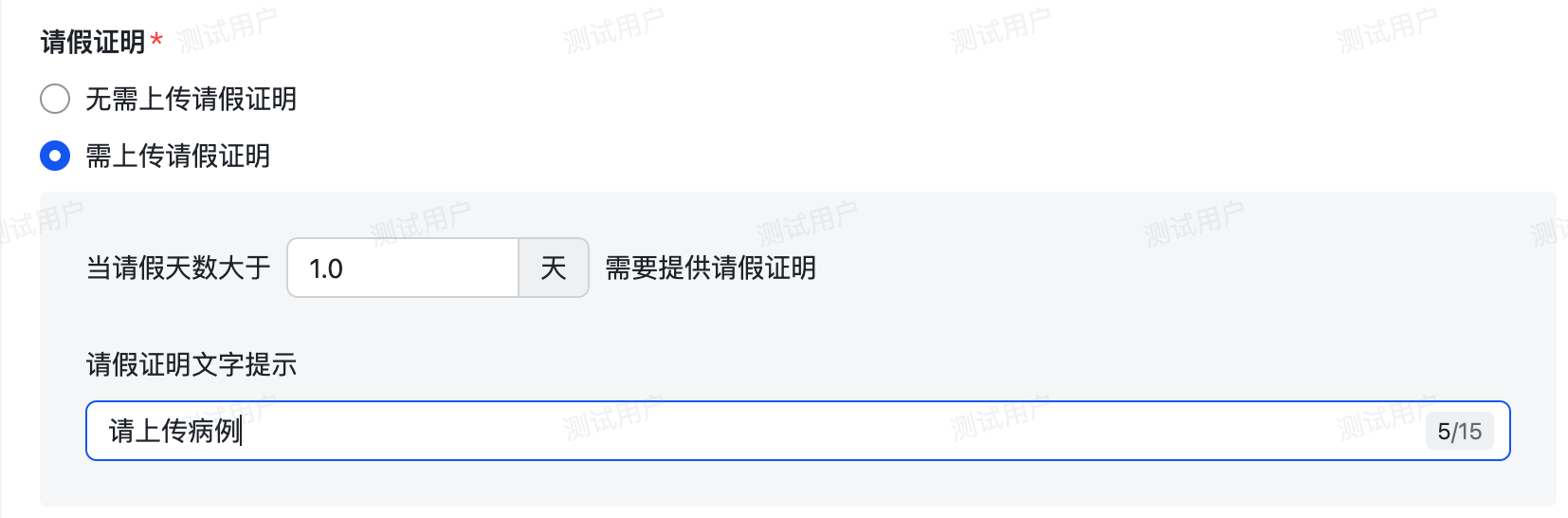 |
| widgetLeaveGroupFeedingArrivingLate | radioV2 | `{ "id": "widgetLeaveGroupFeedingArrivingLate", "type": "radioV2", "value": "30" }` | 上班晚到的分钟数,具体格式可参考单选控件,仅哺乳假需要填写,取值范围是0-120分钟,粒度是15分钟,选项从审批定义中该控件的option中获取 |
| widgetLeaveGroupFeedingOffLeaveEarly | radioV2 | `{ "id": "widgetLeaveGroupFeedingOffLeaveEarly", "type": "radioV2", "value": "30" }` | 下班早走的分钟数,具体格式可参考单选控件,仅哺乳假需要填写,取值范围是0-120分钟,粒度是15分钟,选项即是分钟对应的字符串 |
特殊的参数校验报错信息
| message | 说明 |
|---|---|
| leave type id parse error | 请假类型不是int64 |
| group value is invalid | 当前控件组的值无效,请校验是否为空或者校验类型是否为数组 |
| start time format is not RFC3339 | 开始时间日期格式非RFC3339格式 |
| end time format is not RFC3339 | 结束时间日期格式非RFC3339格式 |
| start time is after end time | 开始时间晚于结束时间 |
| user not in gray | 申请用户不在假勤灰度内 |
| leave type not found | 请假类型不存在 |
| reason is required | 请假原因未填写 |
| leave quote should be bigger than 0 | 请假时长需要大于0 |
| leave is conflict | 所选时间内已有请假记录,请选择其他时间 |
| balance is not enough | 当前假期类型下假期余额不足 |
| certification is required | 需要上传请假证明 |
| arriving late is required | 哺乳假需要填写上班晚到时长 |
| arriving late value is not in the optional items | 晚到时间不在可选范围内 |
| leaving early is required | 哺乳假需要填写下班提前时长 |
| leaving early value is not in the optional items | 下班提前时间不在可选范围内 |
| feeding rest daily is 0 | 哺乳假每日休息时长为0,请重新选择 |
| the operation is prohibited by the workforce rules | 当前账户已在假勤侧封账,无法提交 |
加班控件组
加班控件组请求示例
{
  "id": "widgetWorkGroup",
  "type": "workGroup",
  "value":[
    {
      "id":"widgetWorkGroupOvertimeWorkers",
      "type":"contact",
      "value": ["f8ca557e"],
      "open_ids": ["ou_12345"]
    },
    {
      "id": "widgetWorkGroupType",
      "type": "radioV2",
      "value": "7259635026038505475"
    },
    {
      "id":"widgetWorkGroupTimeRangeFieldList",
      "type":"fieldList",
      "value":[
        [
          {
            "id":"widgetWorkGroupStartTime",
            "type":"date",
            "value":"2019-10-01T08:12:01+08:00"
          },
          {
            "id":"widgetWorkGroupEndTime",
            "type":"date",
            "value":"2019-10-01T08:12:01+08:00"
          }
        ]
      ]
    },
    {
      "id": "widgetWorkGroupReason",
      "type": "textarea",
      "value": "111"
    }
  ]
}
加班控件组参数说明:
| 参数 | 类型 | 是否必填 | 描述 |
|---|---|---|---|
| id | string | 是 | 控件组ID,固定为widgetWorkGroup |
| type | string | 是 | 控件组类型,固定为workGroup |
| value | object[] | 是 | 控件组的值,值为多个子控件值的列表 |
value中包含的子控件值说明:
| id | 类型 | JSON示例 | 描述 |
|---|---|---|---|
| widgetWorkGroupOvertimeWorkers | contact | `{ "id":"widgetWorkGroupOvertimeWorkers", "type":"contact", "value": ["f8ca557e"], "open_ids": ["ou_12345"] }` | 加班人员列表,具体格式可参考联系人控件,如果定义中配置「允许代多人提交」则该字段必填,如果是提交人给自己提交需填写提交人的ID |
| widgetWorkGroupType | radioV2 | `{ "id": "widgetWorkGroupType", "type": "radioV2", "value": "7259635026038505475" // 对应的类型选项ID }` | 加班类型,具体格式可参考单选控件,如果定义中关闭「关联加班规则」则需要填写该字段 |
| widgetWorkGroupTimeRangeFieldList | fieldList | `{ "id":"widgetWorkGroupTimeRangeFieldList", "type":"fieldList", "value":[ [ { "id":"widgetWorkGroupStartTime", "type":"date", "value":"2019-10-01T08:12:01+08:00" }`, `{ "id":"widgetWorkGroupEndTime", "type":"date", "value":"2019-10-01T08:12:01+08:00" }` ] ] } | 加班时段,具体格式可参考明细控件,如果定义中打开「允许提交多个加班时段」则可以传多个,最多支持30个,否则只会取第一个,单次加班时长不可超过两天 |
| widgetWorkGroupReason | textarea | `{ "id": "widgetWorkGroupReason", "type": "textarea", "value": "111" }` | 加班事由,如果定义中配置了「加班事由」必填,则必须填写该字段 |
特殊的参数校验报错信息
| message | 说明 |
|---|---|
| the time range list has more than 30 items | 加班时段数量超过30 |
| group value is invalid | 当前控件组的值无效,请校验是否为空或者校验类型是否为数组 |
| overtime type is required | 未关联加班规则时,加班类型必填 |
| work time range is required | 至少需要一个加班时段 |
| start time is after end time | 开始时间晚于结束时间 |
| start time or end time of range is required | 加班时间段的开始时间和结束时间必填 |
| overtime duration is over 2 days | 单次加班时长不可超过两天 |
| overtime date time zone not support | 加班时段的日期时区信息无法识别 |
| {date} can not apply overtime | 所选时间不可申请加班 |
| {date} already apply overtime | 所选时间已经有加班记录 |
| {date} no need approval | 所选日期加班无需申请 |
| apply reason is required | 定义中设置了加班事由为必填,不可为空 |
| {users} user follow different overtime rules, cannot be submitted in the same form | 所选加班人不在同一个考勤组内,无法同时提交加班 |
| invalid overtime work application | 没有有效的加班申请,请重新选择加班日期 |
| the overtime duration cannot be 0 | 加班时长不能是0 |
| the number of apply workers cannot exceed 50 | 单次申请加班人数量不可大于50 |
| apply worker is required | 必须有加班人,配置置可代多人提交时必须指定加班人 |
| resigned worker can not apply | 离职人员不可申请加班 |
| overtime duration is over limit | 加班时长超过限制 |
外出控件组
外出控件组请求体示例
{
    "id": "widgetOutGroup",
    "type": "outGroup",
    "value":[
        {
            "id": "widgetOutGroupType",
            "type": "radioV2",
            "value":  "me15yqrf-gmjgbml2vhp-0"
        },
        {
            "id": "widgetOutGroupStartTime",
            "type": "date",
            "value":"2019-10-01T08:12:01+08:00"
        },
        {
            "id": "widgetOutGroupEndTime",
            "type": "date",
            "value":"2019-10-01T08:12:01+08:00"
        },
        {
            "id": "widgetOutGroupReason",
            "type": "textarea",
            "value":"123213"
        },
        {
            "id":"widgetOutGroupImage",
            "type":"image",
            "value": ["D93653C3-2609-4EE0-8041-61DC1D84F0B5"]
        }
    ]
}
外出控件参数说明
| 参数 | 类型 | 是否必填 | 描述 |
|---|---|---|---|
| id | string | 是 | 控件组ID,固定为widgetOutGroup |
| type | string | 是 | 控件组Type,固定为outGroup |
| value | object[] | 是 | 控件组的值,值为多个子控件值的列表 |
value中包含的子控件值说明:
| id | 类型 | JSON示例 | 描述 |
|---|---|---|---|
| widgetOutGroupType | radioV2 | `{ "id": "widgetOutGroupType", "type": "radioV2", "value": "me15yqrf-gmjgbml2vhp-0" }` | 外出类型,具体格式可参考单选控件,如果配置了「外出类型」则必填,外出时长单位会选取所选外出类型关联的单位,如果没有配置「外出类型」,则该字段无需填写,计算外出时长时会选取「外出时长」配置的单位 |
| widgetOutGroupStartTime | date | `{ "id": "widgetOutGroupStartTime", "type": "date", "value":"2019-10-01T08:12:01+08:00" }` | 外出开始时间,具体格式可参考日期控件,如果外出时长单位是半天假,则小于12点则认为是上午,否则认为是下午;如果单位是小时,则会按半小时的粒度向前取整 |
| widgetOutGroupEndTime | date | `{ "id": "widgetOutGroupEndTime", "type": "date", "value":"2019-10-01T08:12:01+08:00" }` | 外出结束时间,具体格式可参考日期控件,如果外出时长单位是半天假,则小于12点则认为是上午,否则认为是下午;如果单位是小时,则会按半小时的粒度向后取整 |
| widgetOutGroupReason | textarea | `{ "id": "widgetOutGroupReason", "type": "textarea", "value":"123213" }` | 外出事由,具体格式可参考多行文本控件,如果定义中「外出事由」必填,则必须填写该控件,如果定义配置无需填写,则无需填写该控件 |
| widgetOutGroupImage | image | `{ "id":"widgetOutGroupImage", "type":"image", "value": ["D93653C3-2609-4EE0-8041-61DC1D84F0B5"] }` | 外出证明,具体格式可参考图片控件,如果定义中「外出拍照」必填,则必须填写该控件,如果定义配置无需填写,则无需填写该控件 |
特殊的参数校验报错信息
| message | 说明 |
|---|---|
| group value is invalid | 当前控件组的值无效,请校验是否为空或者校验类型是否为数组 |
| start time format is not RFC3339 | 开始时间日期格式非RFC3339格式 |
| end time format is not RFC3339 | 结束时间日期格式非RFC3339格式 |
| start time and end time must be in the same time zone | 开始时间与结束时间必须是同一时区 |
| out type is required | 如果定义中设定了「外出类型」,则外出类型必填 |
| out start time is required | 外出开始时间必填 |
| out end time is required | 外出结束时间必填 |
| out duration must be greater than 0 | 外出间隔不能为0,请检查起止时间并重新选择 |
| out reason is empty | 如果定义中勾选「外出事由」同时设定必填,则该字段必填 |
| photo is required | 如果定义中勾选「外出拍照」同时设定必填,则该字段必填 |
| out time is conflict | 外出时间有冲突,请确认是否已在该时段申请外出 |