
多维表格记录数据结构
多维表格数据表中的每一行数据都是一条记录(record)。一条记录 record 中的数据用 fields 参数表示。本文档介绍多维表格记录数据 fields 的数据结构。
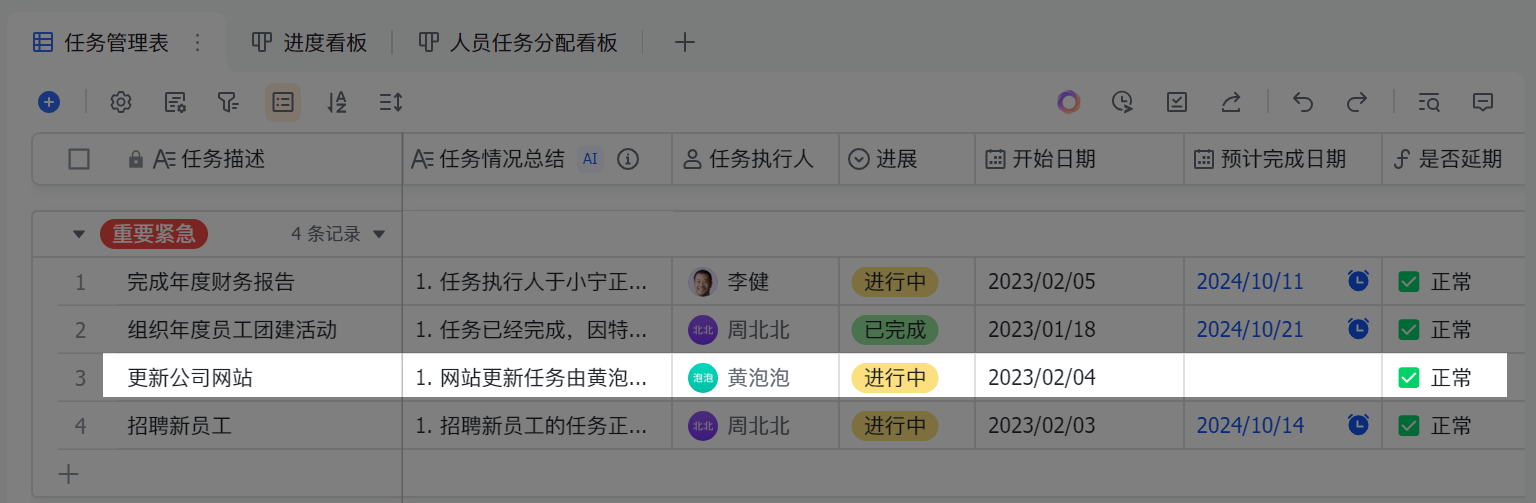
fields 示例
上图中,高亮记录的数据结构如下所示:
json
{
  "fields": {
    "任务情况总结": [
      {
        "text": "网站更新任务由黄泡泡负责,正在进行中",
        "type": "text"
      }
    ],
    "任务执行人": [
      {
        "avatar_url": "https://s1-imfile.feishucdn.com/static-resource/v1/v3_00g2_058610dc-f65c-40c5-afac-46e83919630g~?image_size=72x72&cut_type=default-face&quality=&format=jpeg&sticker_format=.webp",
        "email": "amandahuang@bytedance.com",
        "en_name": "Amanda Huang",
        "id": "ou_8240099442cf5da49f04f4bf8f8abcef",
        "name": "黄泡泡"
      }
    ],
    "任务描述": [
      {
        "text": "更新公司网站",
        "type": "text"
      }
    ],
    "开始日期": 1675440000000,
    "是否延期": {
      "type": 1,
      "value": [
        {
          "text": "✅ 正常",
          "type": "text"
        }
      ]
    }
  }
}
fields 结构
fields 字段为 map 型,由字段名称和其具体内容的键值对组成。
json
{
  "任务情况总结": [
    {
      "text": "网站更新任务由黄泡泡负责,正在进行中",
      "type": "text"
    }
  ]
}| 参数 | 数据类型 | 描述 | 示例值 |
|---|---|---|---|
| key | string | 多维表格数据表中的字段名称。 | "任务情况总结" |
| value | union | 某个字段的具体内容,其结构可以是数字、字符串、布尔型、字符串列表或对象列表。详情参考下文。 | 该示例值为对象列表,更多示例,参考下文。 json [ `{ "text": "网站更新任务正在进行中", "type": "text" }` ] |
key 结构
fields 字段中的 key 始终为字符串类型,对应的是多维表格每列的标题,如 "任务情况总结"。
value 结构
本小节介绍 fields 中不同的字段类型对应的 value 结构的数据类型和示例。
| 字段类型 type 枚举 | 字段类型 | value 数据类型 | value 描述 | value 示例值 | 限制 |
|---|---|---|---|---|---|
| 1 | 文本、邮箱或条码。使用 ui_type 区分,详情参考下面 文本、邮箱或条码 部分的描述。 | 写入时为 string,返回时为 list of object | 请参考下面 文本、邮箱或条码 部分的描述。 | 请参考下面 文本、邮箱或条码 部分的示例。 | 单个单元格内容最多 10 万个字符 |
| 2 | 数字、进度、货币或评分。使用 ui_type 区分: - 当 ui_type 为 "Number" 时,字段类型为数字 - 当 ui_type 为 "Progress" 时,字段类型为进度 - 当 ui_type 为 "Currency" 时,字段类型为货币 - 当 ui_type 为 "Rating" 时,字段类型为评分 | number | 数字类型 | 0.5 | 无 |
| 3 | 单选 | string | 选项名称文本 | "进行中" | 单选字段中的选项总数不能超过 20,000 个 |
| 4 | 多选 | array<string> | 包含多个选项名字符串的数组 | json [ "审批集成", "办公管理", "身份管理" ] | - 多选字段中的选项总数不能超过 20,000 个 - 单个单元格中的选项数不能超过 1,000 |
| 5 | 日期 | number | Unix 时间戳,单位是毫秒 | 1675526400000 | 无 |
| 7 | 复选框 | boolean | 可选值: - true:勾选样式 - false:未勾选样式 | true | 无 |
| 11 | 人员 | list of object | 请参考下面 人员 部分的描述。 | json [ `{ "avatar_url": "https://s1-imfile.feishucdn.com/static-resource/v1/v3_00g2_058610dc-f65c-40c5-afac-46e83919630g~?image_size=72x72&cut_type=default-face&quality=&format=jpeg&sticker_format=.webp", "email": "amandahuang@bytedance.com", "en_name": "Amanda Huang", "id": "ou_8240099442cf5da49f04f4bf8f8abcef", "name": "黄泡泡" }` ] | - 单个单元格的人员数量不能超过 1,000 - 对于记录的写接口,仅支持传入 id 参数 |
| 13 | 电话号码 | string | 电话号码,符合正则表达式 (+)?\d* 的字符串 | "17899870000" | 电话号码长度不能超过 64 |
| 15 | 超链接 | object | 对于超链接类型的字段,value 中的元素定义如下所示: - text:超链接中展示的文本 - link:链接 | json `{ "link": "https://open.feishu.cn/document/home/index", "text": "飞书开放平台" }` | 无 |
| 17 | 附件 | list of object | 请参考下面 附件 部分的描述。 | 请参考下面 附件 部分的示例。 | 单个单元格中的附件数不能超过 100 |
| 18 | 单向关联 | object | 对于单向关联类型的字段,value 为包含多个 record_id 字符串的数组。定义如下所示: - link_record_ids:关联的记录 ID,array 类型,可包含多个记录 ID 字符串。 | json `{ "link_record_ids": [ "reclzUoBLn", "rec7bYQoX1", "recFIE3n52" ] }` | 单个单元格的单向关联数不能超过 500 |
| 19 | 查找引用 | object | 查找引用本质上为公式。其 value 定义与公式相同。请参考下面 公式或查找引用 部分的描述。 | 请参考下面 公式或查找引用 部分的描述。 | 无 |
| 20 | 公式 | object | 请参考下面 公式或查找引用 部分的描述。 | 请参考下面 公式或查找引用 部分的示例。 | 无 |
| 21 | 双向关联 | object | 对于双向关联类型的字段,value 为包含多个 record_id 字符串的数组,定义如下所示: - link_record_ids:关联的记录 ID,array 类型,可包含多个记录 ID 字符串。 | json `{ "link_record_ids": [ "reclzUoBLn", "rec7bYQoX1", "recFIE3n52" ] }` | 单个单元格的双向关联数不能超过 500 |
| 22 | 地理位置 | object | 对于地理位置类型的字段,value 中的元素定义如下所示: - location:经纬度 - pname:省 - cityname:市 - adname:区 - address:详细地址 - name:地名 - full_address:完整地址 | json `{ "address": "学清路10号院学清嘉创大厦", "adname": "海淀区", "cityname": "北京市", "full_address": "字节跳动,北京市北京市海淀区学清路10号院学清嘉创大厦", "location": "116.352681,40.01437", "name": "字节跳动", "pname": "北京市" }` | 无 |
| 23 | 群组 | list of object | 对于群组类型的字段,value 中的元素定义如下所示: - name:群组名称 - avatar_url:群组头像链接 - id:群组的 ID | json [ `{ "avatar_url": "https://s1-imfile.feishucdn.com/static-resource/avatar/default-avatar_9fb72564-d52a-49b0-9de8-f79071a02286_96.webp", "id": "oc_d2a947abb78bbbbb12d4cad55fbabcef", "name": "测试部门" }` ] | 单个单元格中的群组数不能超过 10 个 |
| 1001 | 创建时间 | number | Unix 时间戳,单位是毫秒。 | 1675526400000 | - |
| 1002 | 最后更新时间 | number | Unix 时间戳,单位是毫秒。 | 1675526400000 | - |
| 1003 | 创建人 | object | 对于人员类型的字段,value 中的元素定义如下所示: - id:人员的用户 ID,支持 open_id、union_id 和 user_id - name:人员名称(不支持通过写接口传入) - avatar_url:人员头像链接(不支持通过写接口传入) - en_name:人员英文名称(不支持通过写接口传入) - email:人员邮箱(不支持通过写接口传入) | json [ `{ "avatar_url": "https://s1-imfile.feishucdn.com/static-resource/v1/v3_00g2_058610dc-f65c-40c5-afac-46e83919630g~?image_size=72x72&cut_type=default-face&quality=&format=jpeg&sticker_format=.webp", "email": "amandahuang@bytedance.com", "en_name": "Amanda Huang", "id": "ou_8240099442cf5da49f04f4bf8f8abcef", "name": "黄泡泡" }` ] | 无 |
| 1004 | 修改人 | object | 对于人员类型的字段,value 中的元素定义如下所示: - id:人员的用户 ID,支持 open_id、union_id 和 user_id - name:人员名称(不支持通过写接口传入) - avatar_url:人员头像链接(不支持通过写接口传入) - en_name:人员英文名称(不支持通过写接口传入) - email:人员邮箱(不支持通过写接口传入) | json [ `{ "avatar_url": "https://s1-imfile.feishucdn.com/static-resource/v1/v3_00g2_058610dc-f65c-40c5-afac-46e83919630g~?image_size=72x72&cut_type=default-face&quality=&format=jpeg&sticker_format=.webp", "email": "amandahuang@bytedance.com", "en_name": "Amanda Huang", "id": "ou_8240099442cf5da49f04f4bf8f8abcef", "name": "黄泡泡" }` ] | 无 |
| 1005 | 自动编号 | string | 由自动编号规则组成的字符串。 | "1" | 无 |
文本、邮箱或条码
字段类型 type 枚举为 1 时,字段类型基于 ui_type 区分,可以是文本、邮箱或条码。详情参考下文。
- 当
ui_type为 "Text"时,字段为文本类型,其 value 中的元素定义如下所示:
| 参数 | 数据类型 | 描述 |
|---|---|---|
| type | string | 文本展示类型,可选值有: - text:纯文本类型 - mention:提及人或提及云文档类型 - url:超链接类型 |
| text | string | 文本内容 |
| token | string | 当 type 字段为 mention 时,该字段有效。 - 当 mentionType 为 User 时,token 为用户 ID - 当 mentionType 为 Docx 时,token 为文档的 document_id - 当 mentionType 为 Sheet 时,token 为电子表格的 spreadsheet_token - 当 mentionType 为 Bitable时,token 为多维表格的 app_token |
| link | string | 链接。当 type 字段为 url 时,该字段有效 |
| mentionType | string | 当 type 字段为 mention 时,该字段有效,可选值有: - User:提及用户 - Docx:提及文档 - Sheet:提及电子表格 - Bitable:提及多维表格 |
| mentionNotify | boolean | 当 type 字段为 mention 且 mentionType 字段为 User 时,该字段有效。可选值有: - false:不提及该用户 - true:提及该用户 |
| name | string | 提及的用户名称。当 type 字段为 mention 且 mentionType 字段为 User 时,该字段有效 |
- 当 `ui_type` 为 "Barcode" 时,字段类型为条码类型,其 value 的示例如下所示: - type:固定取值 "text" - text:条码编号 ```json [ { "text": "FS0001", "type": "text" } ] ``` - 当 `ui_type` 为 "Email" 时,字段类型为邮箱类型,其 value 的示例如下所示: - link:邮箱的 URL 链接 - type:固定取值 "url" - text:用户邮箱 ```json [ { "link": "mailto:zhangmin@bytedance.com", "text": "zhangmin@bytedance.com", "type": "url" } ] ``` #### **人员** 对于人员类型的字段,value 中的元素定义如下所示:
Warning 若以下参数作为请求参数使用,仅支持
id参数作为入参。
| 参数 | 数据类型 | 描述 |
|---|---|---|
| id | string | 人员的用户 ID,支持 open_id、union_id 和 user_id |
| name | string | 人员名称,不支持通过写接口传入 |
| avatar_url | string | 人员头像链接,不支持通过写接口传入 |
| en_name | string | 人员英文名称,不支持通过写接口传入 |
| string | 人员邮箱,不支持通过写接口传入 |
附件
对于附件类型的字段,value 中的元素定义如下所示:
| 参数 | 数据类型 | 描述 |
|---|---|---|
| file_token | string | 附件的 token。你可以使用下载素材接口下载该附件 |
| name | string | 附件名称 |
| type | string | 附件的 mime 类型, 如: image/png |
| size | int | 附件大小。单位:字节 |
| url | string | 附件 url 链接,需 access token 鉴权,你可以使用下载素材接口下载该附件 |
| tmp_url | string | 生成附件临时下载链接的 url 链接,需 access token 鉴权,可使用获取素材临时下载链接接口获取链接 |
附件类型的 value 的示例如下所示:
json
[
  {
    "file_token": "J7GdbgNWWoD1fwx7oWccxdgknIe",
    "name": "58cc930b89.png",
    "size": 108867,
    "tmp_url": "https://open.feishu.cn/open-apis/drive/v1/medias/batch_get_tmp_download_url?file_tokens=J7GdbgNWWoD1fwx7oWccxdgknIe&extra=%7B%22bitablePerm%22%3A%7B%22tableId%22%3A%22tblx0Ed2NnBULN6a%22%2C%22rev%22%3A5%7D%7D",
    "type": "image/png",
    "url": "https://open.feishu.cn/open-apis/drive/v1/medias/J7GdbgNWWoD1fwx7oWccxdgknIe/download?extra=%7B%22bitablePerm%22%3A%7B%22tableId%22%3A%22tblx0Ed2NnBULN6a%22%2C%22rev%22%3A5%7D%7D"
  }
]
公式或查找引用
对于公式或查找引用类型的字段,value 中的元素定义如下所示:
| 参数 | 数据结构 | 描述 |
|---|---|---|
| type | number | 用于指定 value 的数据类型,可选值如下所示:(相同字段类型用 ui_type 区分): - 1:文本、条码 - 2:数字、进度、货币、评分 - 3:单选 - 4:多选 - 5:日期 - 7:复选框 - 11:人员 - 13:电话号码 - 15:超链接 - 17:附件 - 18:单向关联 - 19:查找引用 - 20:公式 - 21:双向关联 - 22:地理位置 - 23:群组 - 1001:创建时间 - 1002:最后更新时间 - 1003:创建人 - 1004:修改人 - 1005:自动编号 |
| ui_type | string | 字段的 UI 类型,可选值如下所示: - Text:文本 - Barcode:条码 - Number:数字 - Progress:进度 - Currency:货币 - Rating:评分 - SingleSelect:单选 - MultiSelect:多选 - DateTime:日期 - Checkbox:复选框 - User:人员 - GroupChat:群组 - Phone:电话号码 - Url:超链接 - Attachment:附件 - SingleLink:单向关联 - Formula:公式 - DuplexLink:双向关联 - Location:地理位置 - CreatedTime:创建时间 - ModifiedTime:最后更新时间 - CreatedUser:创建人 - ModifiedUser:修改人 - AutoNumber:自动编号 |
| value | list | type 字段决定 value 的数据结构,可参考本文档中 value 的结构。 注意:当对应的基础类型的数据结构为非 list 形式时,该字段为对应数据的 list 格式。 |
公式或查找引用类型的 value 的示例如下所示:
json
{
  "type": 1,
  "value": [
    {
      "text": "✅ 正常",
      "type": "text"
    }
  ]
}