
支持写入的数据类型
本文档介绍 V2 版本接口支持写入的数据类型。
版本说明
v2 版本的接口是指在接口的 HTTP URL 含有 v2 标识的接口。如增加行列的 URL /sheets/v2/spreadsheets/:spreadsheet_token/dimension_range 中含有 v2,标识该接口为 v2 版本接口。
字符串
"string"数字
123日期
- 调用设置单元格样式 接口,将单元格设置为日期格式,请求体示例如下所示:
{
  "appendStyle": {
    "range": "vJFUIq!A1:A10",
    "style": {
      "formatter": "yyyy/MM/dd"
    }
  }
}- 调用向单个范围写入数据,写入浮点类型的数据,请求体示例如下所示:
{
  "valueRanges": [
    {
      "range": "vJFUIq!A1:A10",
      "values": [
        [
          0
        ],
        [
          1
        ],
        [
          2
        ],
        [
          42101
        ]
      ]
    }
  ]
}
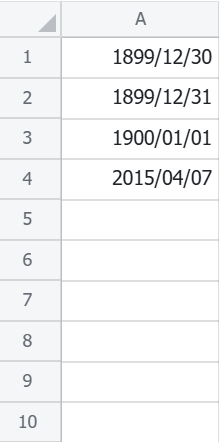
其中,整数部分为自 1899 年 12 月 30 日以来的天数;小数部分为该时间占 24 小时的份额。如上述示例,写入后日期展示如下图所示:
链接
无文本链接
"http://www.dd.com"带文本的链接
{
    "text": "文本",
    "link": "http://www.dd.com",
    "type": "url"
}
邮箱
"aaa@aa.com"@人
Note 当写入 @人 类型时,其处理将以异步方式进行。
- @ 人仅支持 @ 同一租户的用户。
- 使用该类型,单次请求最多支持同时 @ 50人。
| 字段 | 描述 |
|---|---|
| notify | 是否发送飞书消息,没有阅读权限的用户不会收到飞书消息 |
| grantReadPermission | 是否赋予该用户阅读权限(仅在独立表格中支持该字段);仅当拥有文档分享权限时可用 |
| textType | 指定 text 字段传入的内容,可选 email,openId,unionId |
| text | 需要 @ 的人的信息,由 textType 指定 |
{
    "type": "mention",
    "text": "aaa@aa.com",
    "textType": "email",
    "notify": true,
    "grantReadPermission": true
}
公式
text字段为对应的公式,暂不支持跨表引用公式(IMPORTRANGE)
{
    "type": "formula",
    "text": "=A1"
}
@文档
textType:固定为fileToken
text:文档token
objType:文档类型,可选sheet,doc,slide,bitable,mindnote
{
    "type": "mention",
    "textType": "fileToken",
    "text": "shtxxxx",
    "objType": "sheet"
}
下拉列表
values为数组,可填bool,string,number类型。string类型数据不能包含","。使用前需要先使用设置下拉列表接口设置下拉列表。
{
    "type": "multipleValue",
    "values": [
        1,
        "test"
    ]
}
局部样式
segmentStyle
bold:是否加粗
Italic:是否斜体
strikeThrough:是否含有删除线
underline:是否含有下划线
foreColor:字体颜色,16进制rgb颜色
fontSize:字体大小,最小字号9,最大字号36
{
    "bold": true,
    "italic": true,
    "strikeThrough": true,
    "underline": true,
    "foreColor": "#ff00ff",
    "fontSize": 30
}
写入带局部样式的数据
字符串
{
    "text": "string",
    "type": "text",
    "segmentStyle": {
        "bold": true,
        "italic": true,
        "strikeThrough": true,
        "underline": true,
        "foreColor": "#ff00ff",
        "fontSize": 20
    }
}
数字
不支持局部样式
链接
支持对链接中不同字符串写入不同样式。foreColor字段不生效,固定为蓝色;underline字段不生效,固定含有下划线;
{
    "text": "文本",
    "link": "http://www.dd.com",
    "type": "url",
    "texts": [
        {
            "text": "文",
            "segmentStyle": {
                "bold": true,
                "italic": true,
                "strikeThrough": true,
                "underline": true,
                "foreColor": "#ffffff",
                "fontSize": 20
            }
        },
        {
            "text": "本",
            "segmentStyle": {
                "bold": true,
                "italic": false,
                "strikeThrough": true,
                "underline": true,
                "foreColor": "#ffffff",
                "fontSize": 10
            }
        }
    ]
}
邮箱
支持对邮箱中不同字符串写入不同样式。foreColor字段不生效,固定为蓝色;underline字段不生效,固定含有下划线;
{
    "type": "url",
    "text": "aa@bytedance.com",
    "texts": [
        {
            "text": "aa",
            "segmentStyle": {
                "bold": true,
                "italic": true,
                "strikeThrough": true,
                "underline": true,
                "foreColor": "#ffffff",
                "fontSize": 20
            }
        },
        {
            "text": "@bytedance.com",
            "segmentStyle": {
                "bold": true,
                "italic": false,
                "strikeThrough": true,
                "underline": true,
                "foreColor": "#ffffff",
                "fontSize": 10
            }
        }
    ]
}
@人
Note 当写入 @人 类型时,其处理将以异步方式进行。
- @ 人仅支持 @ 同一租户的用户。
- 使用该类型,单次请求最多支持同时 @ 50人。
| 字段 | 描述 |
|---|---|
| notify | 是否发送飞书消息,没有阅读权限的用户不会收到飞书消息 |
| grantReadPermission | 是否赋予该用户阅读权限(仅在独立表格中支持该字段);仅当拥有文档分享权限时可用 |
| textType | 指定 text 字段传入的内容,可选 email,openId,unionId |
| text | 需要 @ 的人的信息,由 textType 指定 |
| segmentStyle | 仅支持对整体设置局部样式;foreColor字段不生效,固定为蓝色 |
{
    "type": "mention",
    "text": "aaa@aa.com",
    "textType": "email",
    "notify": true,
    "grantReadPermission": true,
    "segmentStyle": {
        "bold": true,
        "italic": true,
        "strikeThrough": true,
        "underline": true,
        "foreColor": "#ff00ff",
        "fontSize": 30
    }
}
@文档
textType:固定为fileToken
text:文档token
objType:文档类型,可选sheet,doc,slide,bitable,mindnote
foreColor字段不生效,固定为蓝色;
{
    "type": "mention",
    "textType": "fileToken",
    "text": "shtxxxx",
    "objType": "sheet",
    "segmentStyle": {
        "bold": true,
        "italic": true,
        "strikeThrough": true,
        "underline": true,
        "foreColor": "#ff00ff",
        "fontSize": 30
    }
}
下拉列表
不支持局部样式