
文件概述
本文档介绍云空间中文件相关能力的基础概念、文件 token 的获取方式和文件的 API 列表。
基础概念
文件是云空间内各种类型的文件的统称,泛指云空间内所有的文件。包括在云空间创建的在线文档、电子表格、多维表格、思维笔记、知识库中的文档等,也包括从本地环境上传的各类文件。
文件 token 获取方式
每个文件都有唯一的 token 作为标识。不同类型的文件的 token 命名可能不同,包括 token、 document_id、file_token、app_token、spreadsheetToken 等。
放置在文件夹和知识库中的文件,其 token 的获取方式不同,具体如下所示。
文件夹中的文件
如果文件存储在飞书云空间(云盘)的文件夹中,你可通过以下两种方式获取文件的 token:
方式一:如下图,在浏览器中打开文件,在地址栏中获取文件的 token。

方式二:调用开放平台接口获取。
- 调用获取我的空间(root folder)元数据接口获取根目录(即根文件夹)的 token。
- 继续调用获取文件夹中的文件清单接口,获取根目录下文件的 token。
知识库中的文件
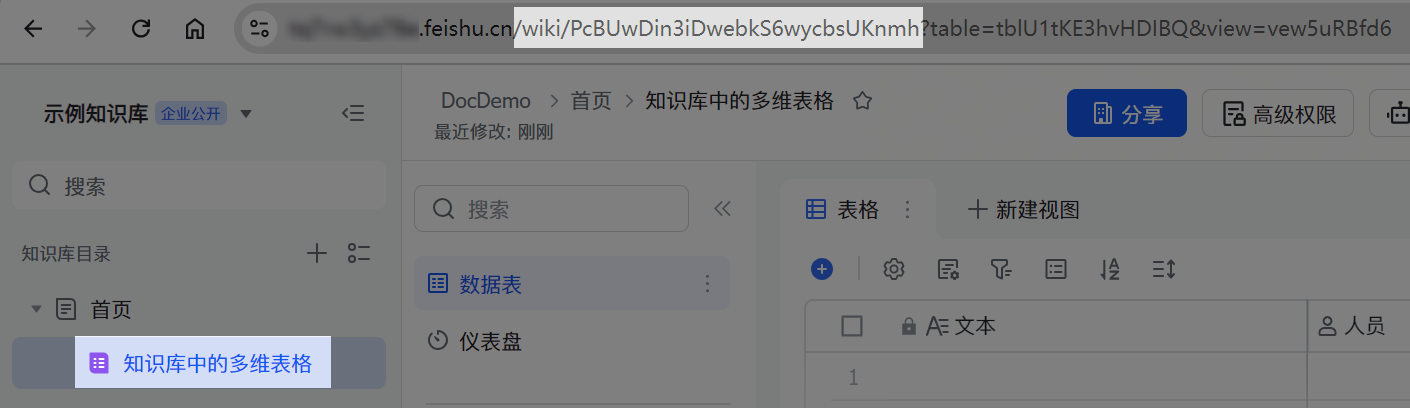
如果文件放置在知识库中,其 URL 中有 wiki 标识,如下图。 此时,该文件也是知识库中的一个节点(node)。
你需调用知识库的获取知识空间节点信息接口,传入该 URL 中的 token 部分,并确保文件类型参数 obj_type 为 wiki,获取该类文件的实际类型 obj_token。
方法列表
以下为文件夹的方法列表。其中,“商店”代表应用商店应用;“自建”代表企业自建应用,了解更多应用相关信息,参考应用类型简介。了解调用服务端 API 的流程,参考流程概述。
| 方法 (API) | 权限要求(满足任一) | 访问凭证 | 商店 | 自建 |
|---|---|---|---|---|
``POST [获取文件元数据](https://open.larkoffice.com/document/uAjLw4CM/ukTMukTMukTM/reference/drive-v1/meta/batch_query) /open-apis/drive/v1/metas/batch_query | drive:drive 查看、评论、编辑和管理云空间中所有文件 drive:drive.metadata:readonly 查看云空间中文件元数据 | tenant_access_token user_access_token | ✓ | ✓ |
``POST [获取文件统计信息](https://open.larkoffice.com/document/uAjLw4CM/ukTMukTMukTM/reference/drive-v1/file-statistics/get) /open-apis/drive/v1/files/:file_token/statistics | drive:drive 查看、评论、编辑和管理云空间中所有文件 drive:drive.metadata:readonly 查看云空间中文件元数据 drive:drive:readonly 查看、评论和下载云空间中所有文件 | tenant_access_token user_access_token | ✓ | ✓ |
``POST [获取文件访问记录](https://open.larkoffice.com/document/uAjLw4CM/ukTMukTMukTM/reference/drive-v1/file-view_record/list)/open-apis/drive/v1/files/:file_token/view_records | contact:user.base:readonly 获取用户基本信息 drive:file:view_record:readonly 获取文档访问记录 | tenant_access_token user_access_token | ✓ | ✓ |
``POST [新建文件](https://open.larkoffice.com/document/ukTMukTMukTM/uQTNzUjL0UzM14CN1MTN)/open-apis/drive/explorer/v2/file/:folderToken | drive:drive 查看、评论、编辑和管理云空间中所有文件 docs:doc 查看、评论、编辑和管理文档 sheets:spreadsheet 查看、评论、编辑和管理电子表格 | tenant_access_token user_access_token | ✓ | ✓ |
``POST [复制文件](https://open.larkoffice.com/document/uAjLw4CM/ukTMukTMukTM/reference/drive-v1/file/copy)/open-apis/drive/v1/files/:file_token/copy | docs:document:copy 复制云文档 drive:drive 查看、评论、编辑和管理云空间中所有文件 | tenant_access_token user_access_token | ✓ | ✓ |
``POST [移动文件](https://open.larkoffice.com/document/uAjLw4CM/ukTMukTMukTM/reference/drive-v1/file/move)/open-apis/drive/v1/files/:file_token/move | drive:drive 查看、评论、编辑和管理云空间中所有文件 space:document:move 移动云空间文件夹和云文档 | tenant_access_token user_access_token | ✓ | ✓ |
``DELETE [删除文件](https://open.larkoffice.com/document/uAjLw4CM/ukTMukTMukTM/reference/drive-v1/file/delete)/open-apis/drive/v1/files/:file_token | drive:drive 查看、评论、编辑和管理云空间中所有文件 space:document:delete 删除云空间文件夹和云文档 | tenant_access_token user_access_token | ✓ | ✓ |
``POST [创建文件快捷方式](https://open.larkoffice.com/document/uAjLw4CM/ukTMukTMukTM/reference/drive-v1/file/create_shortcut)/open-apis/drive/v1/files/create_shortcut | drive:drive 查看、评论、编辑和管理云空间中所有文件 space:document:shortcut 创建云文档的快捷方式 | tenant_access_token user_access_token | ✓ | ✓ |
``POST [搜索文件](https://open.larkoffice.com/document/ukTMukTMukTM/ugDM4UjL4ADO14COwgTN)/open-apis/suite/docs-api/search/object | drive:drive 查看、评论、编辑和管理云文档所有文件 drive:drive:readonly 查看、评论和下载云空间中所有文件 search:docs:read 搜索云文档 | user_access_token | ✓ | ✓ |
``POST [上传文件](https://open.larkoffice.com/document/uAjLw4CM/ukTMukTMukTM/reference/drive-v1/file/upload_all)/open-apis/drive/v1/files/upload_all | drive:drive 查看、评论、编辑和管理云空间中所有文件 drive:file 上传、下载文件到云空间 drive:file:upload 上传文件 | tenant_access_token user_access_token | ✓ | ✓ |
``POST 分片上传文件 - [/open-apis/drive/v1/files/upload_prepare](https://open.larkoffice.com/document/uAjLw4CM/ukTMukTMukTM/reference/drive-v1/file/upload_prepare) - [/open-apis/drive/v1/files/upload_part](https://open.larkoffice.com/document/uAjLw4CM/ukTMukTMukTM/reference/drive-v1/file/upload_part) - [/open-apis/drive/v1/files/upload_finish](https://open.larkoffice.com/document/uAjLw4CM/ukTMukTMukTM/reference/drive-v1/file/upload_finish) | drive:drive 查看、评论、编辑和管理云空间中所有文件 drive:file 上传、下载文件到云空间 drive:file:upload 上传文件 | tenant_access_token user_access_token | ✓ | ✓ |
``GET [下载文件](https://open.larkoffice.com/document/uAjLw4CM/ukTMukTMukTM/reference/drive-v1/file/download)/open-apis/drive/v1/files/:file_token/download | drive:drive 查看、评论、编辑和管理云空间中所有文件 drive:drive:readonly 查看、评论和下载云空间中所有文件 drive:file 上传、下载文件到云空间 drive:file:download 下载云空间下的文件 drive:file:readonly 查看和下载云空间中的文件 | tenant_access_token user_access_token | ✓ | ✓ |
``POST [创建导入任务](https://open.larkoffice.com/document/uAjLw4CM/ukTMukTMukTM/reference/drive-v1/import_task/create)/open-apis/drive/v1/import_tasks | docs:document:import 查看、创建云文档导入任务 drive:drive 查看、评论、编辑和管理云空间中所有文件 | tenant_access_token user_access_token | ✓ | ✓ |
``POST[查询导入任务结果](https://open.larkoffice.com/document/uAjLw4CM/ukTMukTMukTM/reference/drive-v1/import_task/get)/open-apis/drive/v1/import_tasks/:ticket | docs:document:import 查看、创建云文档导入任务 drive:drive 查看、评论、编辑和管理云空间中所有文件 drive:drive:readonly 查看、评论和下载云空间中所有文件 | tenant_access_token user_access_token | ✓ | ✓ |
``POST 导出云文档 - [/open-apis/drive/v1/export_tasks](https://open.larkoffice.com/document/uAjLw4CM/ukTMukTMukTM/reference/drive-v1/export_task/create) - [/open-apis/drive/v1/export_tasks/:ticket](https://open.larkoffice.com/document/uAjLw4CM/ukTMukTMukTM/reference/drive-v1/export_task/get) - [/open-apis/drive/v1/export_tasks/file/:file_token/download](https://open.larkoffice.com/document/uAjLw4CM/ukTMukTMukTM/reference/drive-v1/export_task/download) | docs:document:export 导出云文档 drive:export:readonly 导出云文档 | tenant_access_token user_access_token | × | ✓ |