
文件夹概述
本文档介绍云空间中文件夹相关能力的基础概念、文件夹 token 的获取方式和文件夹的 API 列表。
基础概念
文件夹是飞书云空间中用于管理文件和其它文件夹的容器。每个文件夹都有唯一的 token 作为标识。在不同接口中,其参数命名可能不同,包括 token、 folder_token、folderToken 等。
文件夹 token 获取方式
你可通过以下两种方式获取文件夹的 token:
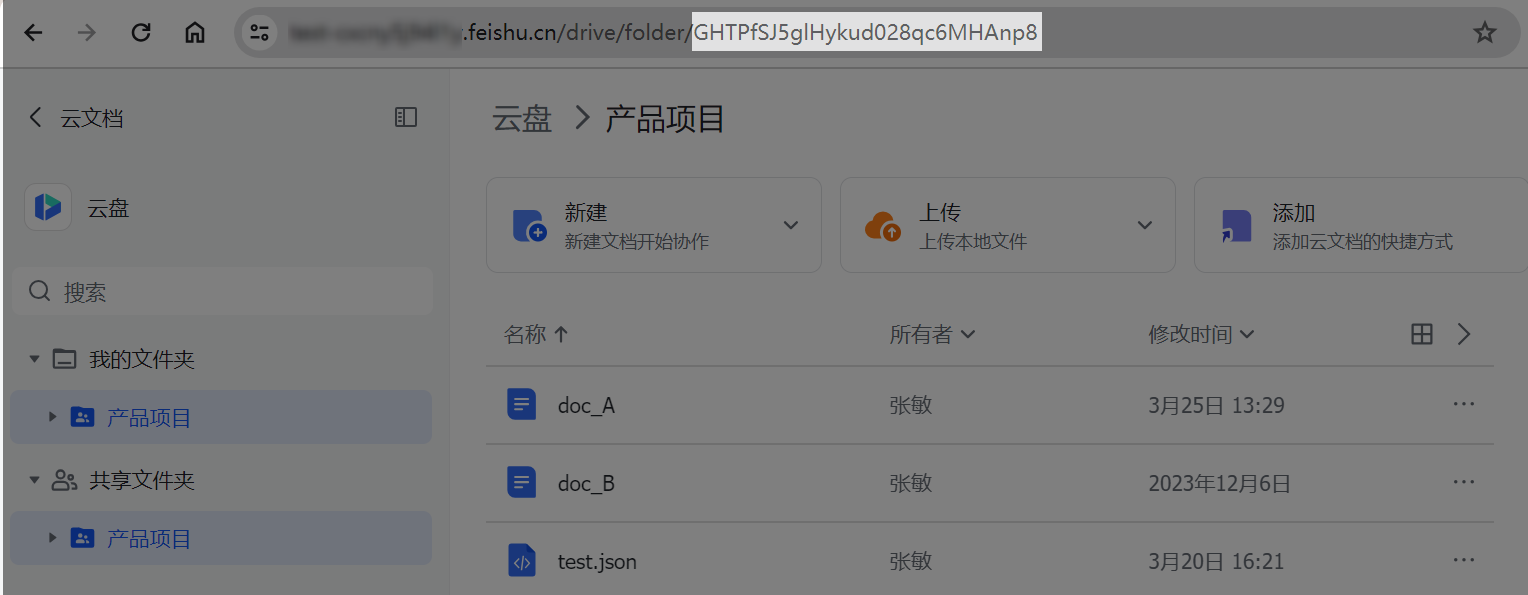
如下图,在浏览器中打开文件夹,在地址栏中获取文件夹的 token。
调用开放平台接口获取:
- 调用获取我的空间(root folder)元数据接口获取根目录(即根文件夹)的 token。
- 继续调用获取文件夹中的文件清单接口,获取根目录下文件夹的 token。
方法列表
以下为文件夹的方法列表。其中,“商店”代表应用商店应用;“自建”代表企业自建应用,了解更多应用相关信息,参考应用类型简介。了解调用服务端 API 的流程,参考流程概述。
| 方法 (API) | 权限要求(满足任一) | 访问凭证 | 商店 | 自建 |
|---|---|---|---|---|
[获取我的空间(root folder)元数据](https://open.larkoffice.com/document/ukTMukTMukTM/ugTNzUjL4UzM14CO1MTN/get-root-folder-meta)GET /open-apis/drive/explorer/v2/root_folder/meta | drive:drive 查看、评论、编辑和管理云空间中所有文件 drive:drive.metadata:readonly 查看云空间中文件元数据 | tenant_access_token user_access_token | ✓ | ✓ |
[获取文件夹中的文件清单](https://open.larkoffice.com/document/uAjLw4CM/ukTMukTMukTM/reference/drive-v1/file/list)GET /open-apis/drive/v1/files | drive:drive 查看、评论、编辑和管理云空间中所有文件 drive:drive:readonly 查看、评论和下载云空间中所有文件 space:document:retrieve 获取云空间文件夹下的云文档清单 | tenant_access_token user_access_token | ✓ | ✓ |
[获取文件夹元数据](https://open.larkoffice.com/document/ukTMukTMukTM/uAjNzUjLwYzM14CM2MTN)GET /open-apis/drive/explorer/v2/folder/:folderToken/meta | drive:drive 查看、评论、编辑和管理云空间中所有文件 drive:drive.metadata:readonly 查看云空间中文件元数据 | tenant_access_token user_access_token | ✓ | ✓ |
[新建文件夹](https://open.larkoffice.com/document/uAjLw4CM/ukTMukTMukTM/reference/drive-v1/file/create_folder)POST /open-apis/drive/v1/files/create_folder | drive:drive 查看、评论、编辑和管理云空间中所有文件 space:folder:create 创建云空间文件夹 | tenant_access_token user_access_token | ✓ | ✓ |
[移动文件或文件夹](https://open.larkoffice.com/document/uAjLw4CM/ukTMukTMukTM/reference/drive-v1/file/move)POST /open-apis/drive/v1/files/:file_token/move | drive:drive 查看、评论、编辑和管理云空间中所有文件 space:document:move 移动云空间文件夹和云文档 | tenant_access_token user_access_token | ✓ | ✓ |
[删除文件或文件夹](https://open.larkoffice.com/document/uAjLw4CM/ukTMukTMukTM/reference/drive-v1/file/delete)DELETE /open-apis/drive/v1/files/:file_token | drive:drive 查看、评论、编辑和管理云空间中所有文件 space:document:delete 删除云空间文件夹和云文档 | tenant_access_token user_access_token | ✓ | ✓ |
[查询异步任务状态](https://open.larkoffice.com/document/uAjLw4CM/ukTMukTMukTM/reference/drive-v1/file/task_check)GET /open-apis/drive/v1/files/task_check | drive:drive 查看、评论、编辑和管理云空间中所有文件 drive:drive.metadata:readonly 查看云空间中文件元数据 drive:drive:readonly 查看、评论和下载云空间中所有文件 | tenant_access_token user_access_token | ✓ | ✓ |